
About SpriteLab
SpriteLab is a web app that makes 2D game assets for indie developers: sprites, animations, direction sheets, seamless tiles and icons, exported as files that Godot, Unity and GameMaker import directly. It is an independent product, built and run by the SpriteLab team — not a feature of an engine or of an AI company.
Why it exists
Small teams and solo developers usually hit the same wall: the game works with placeholder squares, but there is no budget or time to draw every character, enemy, item and animation. General AI image tools produce nice pictures, but a picture on a white background, with blurry fake pixels and a character that changes between frames, is not something you can drop into a game.
SpriteLab is built around the parts that make an image usable as a game asset: transparency, a real pixel grid, a consistent outline, frames of equal size on one ground line, and files named and laid out the way each engine expects. The guides on this site cover the other half of that work: what you set up in your engine once the files are on disk.
How the output is made
Every asset is generated by AI models and then processed by our own code. Here is what happens to a request, in order:
- 01
Your prompt is read
The prompt picks the asset type, art style and view (or you set them yourself). Prompts in other languages are translated to English first.
- 02
An image model draws it
Generation runs on hosted image models through Runware, with Cloudflare Workers AI as a fallback when capacity is short. We pick the model per task and price; you never need an API key.
- 03
We turn the image into a sprite
Our own post-processing removes the background to real transparency, and for pixel styles snaps the image to one pixel grid with a limited palette and a consistent outline. Tiles are checked at the edges and blended so they repeat without seams.
- 04
Animations are planned, then drawn
For an animation, Claude (by Anthropic) plans the key poses for that specific sprite; the image model draws them from your sprite as a reference; we cut out the frames, align them on one ground line, match their colours and build the sheet, GIF and engine pack. Idle breathing is made by gently deforming your original sprite instead of redrawing it.
- 05
If it fails, you get your credits back
When a generation fails or comes back broken — for example a direction sheet with a sliced figure — it is rejected and the credits are returned automatically.
The full list of services that touch your data is in the privacy policy.
Real output
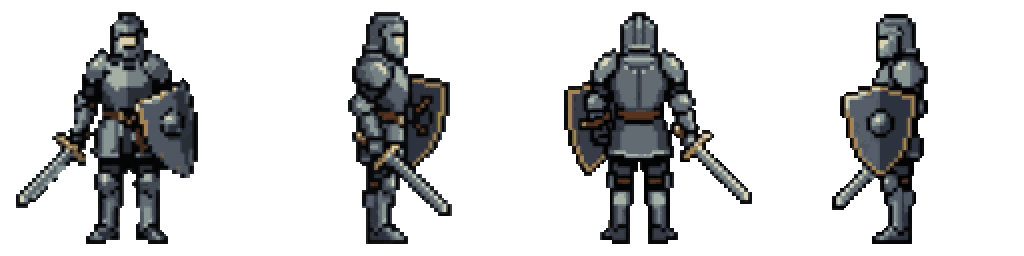

Examples from our showcase, made with SpriteLab: a sprite, a 4-direction view sheet and an animation.

What SpriteLab does not do
Being clear about limits saves you time:
- No 3D models, no public API and no MCP server at the moment.
- No full autotile sets (edges and corners); single seamless tiles and animated tiles only.
- No Unity, Godot or GameMaker plugins — the exports are standard files those engines import with their own tools.
- No guarantee that a generated asset is perfect. For a hero character or a key boss, plan on a manual polish pass in a pixel editor.
Ownership, ads and money
Assets you generate can be used in commercial games without attribution; the details are in the terms. SpriteLab is paid for by credit plans and packs (see pricing) and by ads shown on guide articles and comparisons to visitors who are not signed in. Members never see ads, and the app itself is ad-free.
Get in touch
Bug reports, billing questions, feature requests and press: write to spritelab.contact@gmail.com.