
How to Make a 4-Direction Top-Down RPG Character
Build a 4-direction RPG character sheet: row order conventions, when mirroring left from right works, standing frames, input handling and the usual pitfalls.
By SpriteLab team7 min read
The short answer
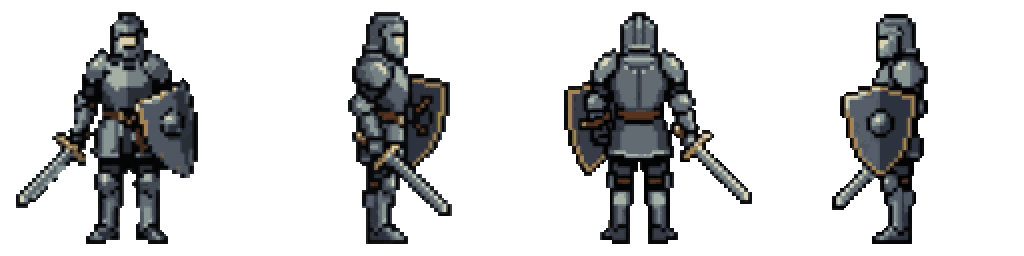
A 4-direction top-down character needs the same walk drawn facing down (towards the camera), right, up (away from the camera) and left, usually as a grid with one direction per row and 3–4 frames per row. Pick a row order and keep it for every character in the game, decide whether the left row is a mirrored copy of the right row, and use a standing frame per direction for when the player stops. In code, choose the facing from the dominant input axis and play the matching row.
Row order: there is no single standard
Different tools and asset packs order the rows differently, and mixing them is the most common reason a character walks backwards on the first try. Write your order down and convert every sheet you buy or make into it.
| Source | Row 1 | Row 2 | Row 3 | Row 4 | Frames per row |
|---|---|---|---|---|---|
| RPG Maker MV/MZ character sheets | Down | Left | Right | Up | 3 |
| LPC (Liberated Pixel Cup) walk sheets | Up | Left | Down | Right | 9 |
| SpriteLab 4-direction walk | Down | Right | Up | Left | 4 |
Frames per direction
Three frames per row (left step, standing, right step, played as 1-2-3-2) is the classic minimum and still looks good at 16–32 px. Four frames gives a cleaner cycle: left foot forward, feet passing, right foot forward, feet passing. Six to eight frames per row makes sense for larger characters or a slower, heavier walk.
Front and back views are harder than side views because the legs move towards and away from the camera. The movement shows mostly as one leg being slightly lower and the body bobbing by one pixel. Exaggerate the bob and the arm swing a little; at small sizes a physically accurate walk often reads as standing still.
Mirroring left from right: when it works
Drawing only the right-facing row and flipping it horizontally for the left halves the side-view work, and most players never notice. It breaks on anything asymmetric, because the flipped copy swaps it to the other side:
- Weapons and shields: a sword in the right hand ends up in the left hand when the character faces left.
- Hair partings, eye patches, scars, badges and single shoulder pads jump sides.
- Lighting: if the art is lit from the top-left, the flipped row is lit from the top-right.
- Text or symbols on clothing read backwards.
If the character has a strong asymmetric feature, draw both side rows. Otherwise mirroring is a reasonable trade, and in engines it is free: flip the sprite at runtime (flip_h in Godot, flipX on Unity's SpriteRenderer, image_xscale = -1 in GameMaker) and you do not even need the fourth row. Keeping a real left row in the sheet is still useful if you plan to fix those details later.
Standing still: which frame to show
When the player stops, show a neutral pose for the current facing. If you have no separate idle per direction, use the passing frame of the walk (feet together), not the first frame — the first frame of most walk cycles is a stride, and stopping on it looks like the character froze mid-step.
A separate set of standing poses for all four directions is the cleaner solution. It can be as simple as one frame per direction, or a slow 2–4 frame breathing loop for each.
Choosing the facing from input
Read the movement input as a vector and pick the axis with the larger magnitude. On a perfect diagonal both are equal; resolve ties by keeping the current facing, otherwise the character flickers between two rows when the stick sits near 45°. Store the last facing so the standing pose points the way the player was walking.
extends CharacterBody2D

const SPEED := 60.0
var facing := "down"
@onready var anim: AnimatedSprite2D = $AnimatedSprite2D

func _physics_process(_delta: float) -> void:
    var input := Input.get_vector("ui_left", "ui_right", "ui_up", "ui_down")
    velocity = input * SPEED
    move_and_slide()

    if input == Vector2.ZERO:
        anim.animation = "walk_" + facing
        anim.stop()
        anim.frame = 1  # feet passing: a neutral standing pose
        return

    if absf(input.x) > absf(input.y):
        facing = "right" if input.x > 0.0 else "left"
    elif absf(input.y) > absf(input.x):
        facing = "down" if input.y > 0.0 else "up"
    # equal: keep the current facing to avoid flicker on diagonals

    anim.play("walk_" + facing)
Top-down pitfalls
These problems show up in almost every first top-down prototype:
- Collision box on the whole sprite: use a small box at the feet only, so the character can walk 'behind' the top of a wall or tree.
- Wrong draw order: sort by the y of the feet (Godot: enable Y Sort on the parent and put the origin at the feet; Unity: Transparency Sort Axis (0, 1, 0) with a bottom pivot; GameMaker: depth = -y).
- Different heights per direction: the back view drawn a pixel taller than the front makes the character pop when turning. Keep the same canvas and ground line for every row.
- Diagonal speed: normalise the input vector (Input.get_vector already does) so diagonals are not 41% faster.
- Animation speed tied to frames, not distance: a walk that loops at 6 fps should move a matching distance per loop, or the feet slide.
When eight directions are worth it
Eight directions add the four diagonals: down-right, up-right, up-left and down-left. They matter when the character moves freely rather than along a grid — twin-stick shooters, action RPGs, isometric games — because a character walking diagonally while facing straight sideways looks like it is sliding. On a tile grid where movement is mostly horizontal and vertical, the diagonals are rarely seen and the extra work is hard to justify.
The cost is real: eight directions is roughly twice the art of four for every animation that needs facing, not just the walk. With mirroring, you draw five directions (down, down-right, right, up-right, up) and flip three. For input, split the circle into eight 45° sectors around the movement angle instead of comparing the axes, and add a few degrees of hysteresis at the borders so an analogue stick resting near a boundary does not flicker between two rows.
Making the sheet with SpriteLab
SpriteLab's Animate tool has a '4-direction walk' option for characters and creatures (12 credits). It draws the walk facing the viewer, facing right and facing away — 4 steps each — from the sprite you already made, and builds the left row by mirroring the right row, so the asymmetry caveats above apply. The result is a 4×4 sheet in the order down, right, up, left at 6 fps, with every frame the same size on one ground line. The engine pack splits it into walk_down, walk_right, walk_up and walk_left for Godot, Unity and GameMaker.
For standing poses, the separate '4 directions' option (6 credits) draws the same sprite from the front, right, back and left in a neutral stance — useful as idle frames. SpriteLab does not make a different idle animation per direction, and it cannot guarantee that a held item stays in the correct hand after mirroring; check those frames and fix them in a pixel editor if your character carries something distinctive.

Frequently asked questions
What order should the rows of a 4-direction sprite sheet be in?
Any order works if it is consistent. Common ones are down, left, right, up (RPG Maker) and up, left, down, right (LPC). SpriteLab uses down, right, up, left.
Can I mirror the right-facing walk for the left?
Yes, unless the character is visibly asymmetric. Mirroring moves weapons to the other hand and flips lighting, hair partings and markings.
How many frames does a top-down walk need?
Three or four per direction is enough for 16–32 px characters. Larger sprites look better with six to eight.
Should a top-down character have 4 or 8 directions?
Four is enough for most tile-based RPGs and much less work. Eight suits free-moving action games and isometric views, at twice the art.