
Sprite Sheet Generator
Describe a character, pick how it moves and download a sprite sheet: one row of equal-size frames on a transparent PNG, plus the single frames, a GIF and a pack your engine opens as it is.
- equal-size frames
- transparent png
- 4 and 8 directions
- godot, unity, gamemaker



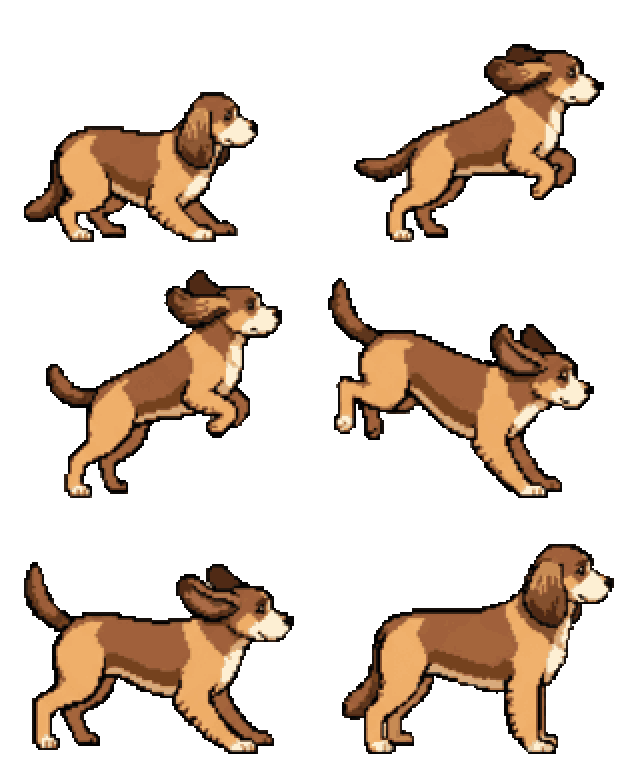
Sprite sheets made with SpriteLab
Each sheet below is a real SpriteLab export, shown at a whole-pixel scale. The orange lines mark the frame cells.



What you download
A sprite sheet, sometimes called a sprite atlas or sprite map, is one image that holds every frame of an animation. SpriteLab keeps it as simple as engines like it.
- Layout
- One horizontal row, frames left to right in play order, no padding between cells
- Cell size
- Every frame the same size, 256 px tall; wide attacks get wider cells
- Frames
- 4, 6 or 9 key poses, or 8, 12 or 18 with smooth mode
- Directions
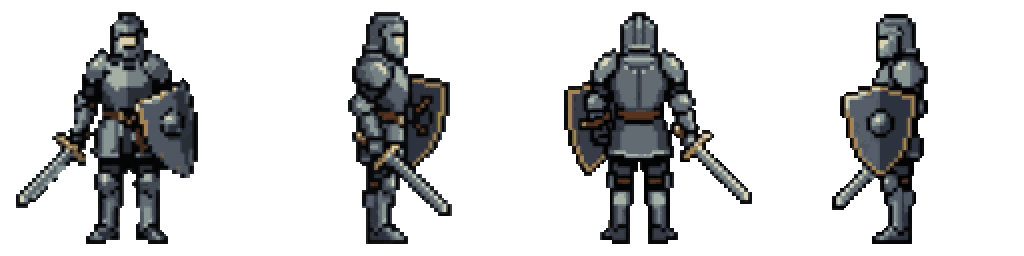
- 4 directions (front, right, back, left), 8 directions every 45°, or a 4-direction walk of 4 rows × 4 steps
- Background
- Real alpha transparency
- Downloads
- Sheet PNG, single frames in a ZIP, a GIF preview, and an engine pack
- Engine pack
- Godot SpriteFrames .tres, numbered Unity frames, GameMaker strips and hitboxes.json
Because every cell is the same size and there is no padding, slicing is one setting in any engine: in Unity, Sprite Mode Multiple and Slice → Grid By Cell Size with the frame width and height; in Godot 4, 'Add frames from sprite sheet' with Horizontal set to the frame count and Vertical to 1; in GameMaker, import the strip and it splits itself.
The frames are aligned on the body, so the feet stay on one baseline and nothing slides or bobs that shouldn't. In pixel styles every frame shares one pixel grid and one palette, so colours don't flicker from frame to frame and the character keeps its size.
If you'd rather not slice anything, take the engine pack. It is one ZIP per character with a ready SpriteFrames resource for Godot, a folder of numbered frames per animation for Unity, strips GameMaker splits on import, and hitboxes.json with a body box and a strike box for every frame.
From a sentence to a sprite sheet
- step 01
Make the sprite
Describe it, pick a style and get a transparent sprite. Try it without an account, or sign up for 10 free credits.
- step 02
Pick the motion
Idle, walk, run, attack, jump, cast, hurt, a turnaround or your own move. Choose 4, 6 or 9 frames and turn on smooth mode if you want in-betweens.
- step 03
Download the sheet
Sheet PNG, frames ZIP, GIF or the engine pack. Every result is saved in your assets, so you can come back for another format later.
Common questions
What frame size do the sprite sheets use?
Frames are 256 px tall. Most are square (256×256); when an attack or effect reaches out, the cells get wider so the character keeps its size. Pixel art sits on a 128-pixel grid drawn at 2×, so you can halve it with nearest-neighbour scaling and keep every pixel.
Are all frames the same size?
Yes. Every frame in a sheet has the same width and height, laid out in one row with no padding, so you can slice it by cell size in any engine.
How do I cut the sheet in Unity or Godot?
Unity: set Sprite Mode to Multiple, open the Sprite Editor and use Slice → Grid By Cell Size with the frame width and height. Godot 4: in an AnimatedSprite2D's SpriteFrames, click 'Add frames from sprite sheet' and set Horizontal to the number of frames and Vertical to 1. Or skip slicing and use the engine pack.
Can I upload my own sprite and turn it into a sheet?
Not at the moment. Animations start from a sprite made in SpriteLab, so the style, outline and transparency are already right for animating.
How much does a sprite sheet cost?
Animations cost 4 frames 7 credits, 6 frames 11 credits, 9 frames 12 credits. Smooth mode doubles the frames: 8 frames 12, 12 frames 18, 18 frames 19 credits. Turnarounds cost 6 credits for 4 directions and 10 for 8, and a 4-direction walk 12. You get 10 free credits when you sign up, no card needed.
What's the difference between a sprite sheet and a sprite atlas?
A sprite sheet usually holds the frames of one animation in a regular grid; an atlas packs many different sprites into one texture, often at irregular positions with a data file. SpriteLab exports regular sheets, which every engine can slice without a data file.
ship it
Make your first sprite sheet
Generate a sprite, animate it and download the sheet in a couple of minutes.
10 free credits on signup · no credit card required