

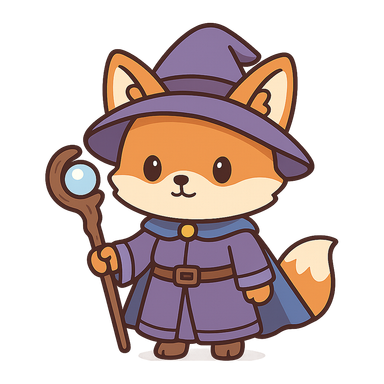
Before
The original sprite, made in the Chibi style.

Loading…
Change a sprite by describing the change: recolour the armour, swap the hat, add a scar. Paint over the part you want changed and everything else stays exactly as it was. Works on sprites made here and on sprites you upload.
Made with SpriteLab's Edit tool. The instruction was: “change the purple robe and hat to a deep red robe and hat with gold trim”. The fox, its pose, staff and proportions stay the same.
The original sprite, made in the Chibi style.
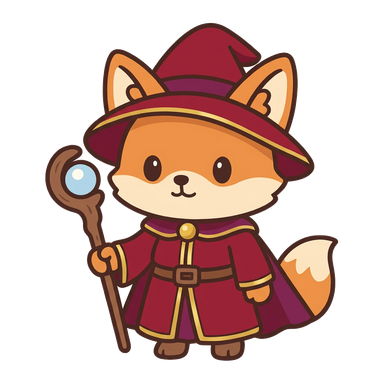
The same sprite after one edit: red robe and hat with gold trim.
Each tool works on a sprite in your assets, whether you generated it or uploaded it.
Edit with AI redraws the sprite from your sprite and your sentence, so it is best at changes of colour, material, clothing, accessories and small details. With a brush mask, everything outside the painted area is copied back from the original pixel for pixel, so the face or the outline you like can't drift.
Pixel art goes back onto the sprite's own pixel grid and palette after the edit, so an edited sprite still matches the rest of your set. Painted styles keep their soft edges.
Big changes of pose or camera are a different job: make a new sprite with the view you need, or animate the sprite. And an upload is only as usable as the art you bring, so upload art you made or have the rights to; uploads and anything made from them can't be shared to the community gallery.
Open any sprite from your assets, or upload a PNG, JPG or WebP of your own.
Say what should change in one sentence. To protect the rest, paint over only the part that may change.
Download the PNG, use the result as the start of the next edit, or send it to Animate for a sprite sheet.
Yes. Upload a PNG, JPG or WebP up to 8 MB. A plain background is removed, and then you can edit, animate or turn the sprite like one made in SpriteLab. Uploading is free and private.
Yes. The edited sprite is put back onto its own pixel grid with a limited palette, so it keeps whole pixels and matches the rest of your set.
Yes. Paint over the area that may change. Everything outside the painted area is copied back from the original pixel for pixel.
An edit costs 5 credits on every plan. Uploading is free, pixel-perfect upscaling is free, background removal is 1 credit on Starter and up, and AI upscaling is 1–2 credits on Pro and Studio. You get 10 free credits when you sign up.
You describe the change instead of drawing it, which is quick for recolours, outfits and details. For exact pixel-by-pixel control, download the PNG and finish it in your editor.
ship it
Make a sprite or upload your own, then change it with one sentence.
No credit card required