
How to Make an 8-Direction Walk Cycle
Plan, draw and wire up an 8-direction walk: which five directions to draw, frame counts, mirroring, row order and picking the facing in Godot and Unity.
By SpriteLab team6 min read
The short answer
An 8-direction walk is the same walk cycle drawn facing south, south-east, east, north-east and north, with the other three directions (south-west, west, north-west) usually mirrored from their east-side twins. Give every direction the same number of frames, often 6 or 8, keep the character on one ground line and at one size in all of them, and store one direction per row. In code, split the movement angle into eight 45° sectors and play the row for the sector the input points into.
Do you need eight directions?
Four directions are enough for most tile-based RPGs, where movement is mostly horizontal and vertical. Eight start to matter when the character moves freely: twin-stick shooters, action RPGs, isometric games and anything controlled with an analogue stick. There, a character walking diagonally while facing straight sideways looks like it is sliding.
The cost is real. Every animation that has a facing, not just the walk, needs the extra directions: idle, run, attack and hurt too. With mirroring you draw five directions instead of three, so plan on roughly 1.7 times the art of a 4-direction character for each animation.
Directions, angles and row order
There is no standard order for the rows of an 8-direction sheet; asset packs and tools all differ. Pick one, write it down and use it for every character. One clear option is to go round the compass from south:
| Row | Direction | Faces | Input angle (y down) | Mirror of |
|---|---|---|---|---|
| 1 | S | Towards the camera | 67.5°–112.5° | — |
| 2 | SE | Front-right three-quarter | 22.5°–67.5° | — |
| 3 | E | Right profile | −22.5°–22.5° | — |
| 4 | NE | Back-right three-quarter | −67.5°–−22.5° | — |
| 5 | N | Away from the camera | −112.5°–−67.5° | — |
| 6 | NW | Back-left three-quarter | −157.5°–−112.5° | NE |
| 7 | W | Left profile | 157.5°–180° and −180°–−157.5° | E |
| 8 | SW | Front-left three-quarter | 112.5°–157.5° | SE |
The angles assume screen coordinates with y pointing down, as in Godot and GameMaker's room space. In Unity, where y points up, north and south swap signs.
Frames and timing
Every direction should have the same frame count and the same timing. If the east walk has 8 frames and the south-east walk has 6, the steps fall out of rhythm when the player turns, and the character seems to stumble.
Six frames per direction is a good middle ground for 32–64 px characters: contact, down, passing for each foot. Eight frames gives a smoother, heavier walk for bigger sprites. Four can work at 16–24 px, where there is little room for in-betweens anyway. Play walks at about 8–12 frames per second and tie the playback speed to the movement speed so the feet don't skate.
Drawing the diagonal directions
The diagonals are where 8-direction walks usually go wrong. A few rules keep them believable:
- Draw the three-quarter turnaround first, a standing pose for every direction, and animate from it. A walk can only be as consistent as its standing poses.
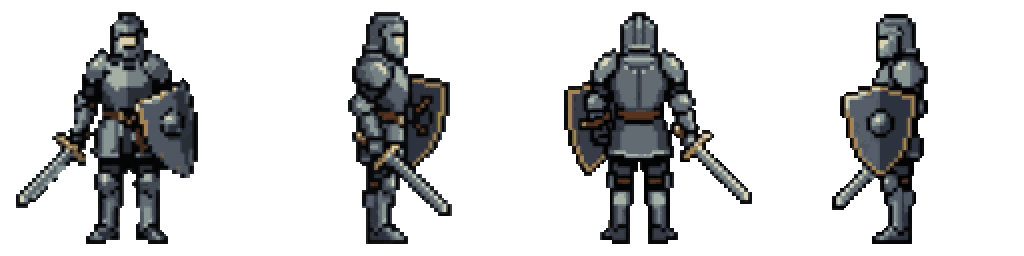
- Keep the head size, body height and ground line identical across all eight directions; check by stacking the standing poses on top of each other.
- In the south-east and north-east views, the far leg and arm are partly hidden. Let them overlap the body rather than shrinking them.
- Move the feet along the walking direction, which on screen is diagonal: each step goes a little down-right (SE) or up-right (NE), not straight sideways.
- Exaggerate the vertical bob and the arm swing slightly. At small sizes an accurate walk often reads as standing still.
Mirroring and its catches
Mirroring the east side for the west side saves three of eight directions, and engines flip sprites for free (flip_h in Godot, flipX on Unity's SpriteRenderer, image_xscale = -1 in GameMaker). It breaks on asymmetric characters: a sword in the right hand ends up in the left, hair partings and scars jump sides, and light from the top-left becomes light from the top-right. If those details matter, draw all eight directions; the 4-direction guide covers the same trade-off in more detail.
Picking the facing from input
Read the movement as a vector, take its angle and round it to the nearest 45° sector. Only update the facing while the character is actually moving, so the last direction is kept when the player stops. With an analogue stick, add a few degrees of hysteresis at the sector borders: change direction only when the angle is clearly inside a new sector, otherwise the sprite flickers between two rows when the stick rests near a border.
In Unity, an Animator Blend Tree of type 2D Simple Directional with the eight walk clips placed at their directions does the same job without code. In GameMaker, use point_direction and divide by 45.
const DIRS := ["e", "se", "s", "sw", "w", "nw", "n", "ne"]
var facing := "s"

func update_facing(velocity: Vector2) -> void:
	if velocity.length() < 1.0:
		$AnimatedSprite2D.play("idle_" + facing)
		return
	# angle() is 0 pointing right and grows clockwise (y points down)
	var sector := int(round(velocity.angle() / (PI / 4.0)))
	sector = (sector % 8 + 8) % 8
	facing = DIRS[sector]
	$AnimatedSprite2D.play("walk_" + facing)
What SpriteLab can and can't do here
SpriteLab doesn't generate an 8-direction walk cycle. It has two related tools. "8 directions" (10 credits) draws your sprite standing in all eight directions in the order front, front-right, right, back-right, back, back-left, left, front-left, at the same size on one ground line: a turnaround you can use as the standing poses and as the reference for drawing diagonal walk frames. "4-direction walk" (12 credits) animates the walk facing down, right, up and left, 4 steps each, with the left row mirrored from the right.
A practical route is to take the 4-direction walk for the cardinal rows, use the 8-direction turnaround for the diagonal standing poses, and draw the diagonal walk frames in a pixel editor on top of those poses, keeping the same frame count and timing as the cardinal rows. The engine pack splits the 4-direction walk into walk_down, walk_right, walk_up and walk_left for Godot, Unity and GameMaker, which you can rename to match the scheme above.
Frequently asked questions
Which directions do I have to draw for an 8-direction walk?
Usually five: south, south-east, east, north-east and north. South-west, west and north-west can be mirrored, unless the character is visibly asymmetric.
How many frames should each direction have?
The same number in every direction: 6 is a good default for 32–64 px characters, 8 for larger or heavier ones, 4 for very small sprites.
4 or 8 directions for a top-down game?
Four for tile-based movement, eight for free movement with a stick or the mouse, such as twin-stick shooters, action RPGs and isometric games.
Can SpriteLab make an 8-direction walk?
Not as one animation. It draws an 8-direction standing turnaround and a 4-direction walk; the diagonal walk frames are drawn on top of those.